

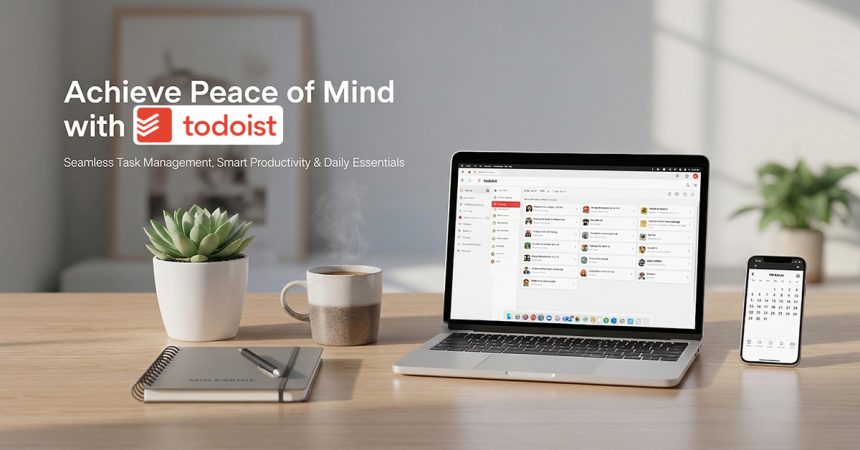
When it comes to decluttering your mind, world-class task organization, and staying on top of both professional projects and personal goals, Todoist stands out as the premier global choice for millions who value clarity, efficiency, and elevated productivity. Through its official online platform, the brand offers a powerful ecosystem of natural language input, collaborative workspaces, and intuitive visualization tools designed for users who want to organize their life and then go enjoy it.
From managing complex business roadmaps and team sprints to simple grocery lists and daily habits, Todoist combines minimalist design with robust functionality to help you plan days that feel both productive and balanced. Here’s your ultimate Todoist productivity guide for 2026.
Productivity Experiences for Every Area of Life
At the core of Todoist is a mission to help people achieve “mental clarity” by providing a reliable place to capture everything. The brand focuses on flexible organization that scales with your needs.
- Personal & Daily Planning
Effortlessly track appointments, errands, and habits using the “Today” and “Upcoming” views to stay grounded in the present. - Professional Project Management
Organize work initiatives into dedicated projects with subtasks, sections, and priority levels to keep high-stakes deadlines in focus. - Team Collaboration & Workspaces
Shared environments where teams can assign tasks, share files, and discuss progress in real-time without losing track of individual responsibilities. - Education & Goal Tracking
Specialized templates and filters designed for students, educators, and goal-seekers to connect high-level dreams to daily actions.
Whether you are a freelancer managing multiple clients, a student juggling coursework, or a parent coordinating a busy household, Todoist offers options that blend simplicity, power, and cross-platform reliability.
Intelligent Capture & Value-Added Pro Features
Todoist is known for its “Natural Language Processing,” pairing its iconic quick-add feature with advanced AI-driven insights. The brand highlights its Pro and Business plans, which bundle essential features like reminders and unlimited activity history to help you maximize your output.
Key brand highlights include:
- Quick Add & Natural Language: Type “Call the dentist at 2pm every Tuesday” and Todoist automatically sets the reminder and recurring schedule.
- Visual Flexibility: Switch instantly between List, Board (Kanban), and Calendar views to see your work from every angle.
- Task Assist AI: A built-in assistant that suggests subtasks for complex goals and helps summarize long task descriptions.
- Productivity Trends (Karma): A gamified system that tracks your streaks and visualizes your daily and weekly progress to keep you motivated.
- Seamless Ecosystem: Real-time sync across 60+ integrations including Google Calendar, Slack, Outlook, and specialized time-blockers.
These features make Todoist appealing for those who want more than just a list—they want a digital extension of their mind that offers structure, focus, and curated peace of mind.
Popular Organization Categories

The Todoist platform offers a wide selection of planning tools to suit your workflow:
- Views & Layouts
- Today (Your immediate focus)
- Upcoming (A 7-day lookahead)
- Filters & Labels (Customized sorting by energy, time, or context)
- Calendar View (Visual time-blocking)
- Collaboration Tools
- Shared Projects & Workspaces
- Task Comments & File Attachments
- Roles & Permissions (Admin, Member, Guest)
- Planning Resources
- 50+ Ready-to-Use Templates (Work, Personal, Education)
- Project Folders & Sections
- Task Durations & Deadlines
- Integrations
- Email-to-Task (Forward emails directly to projects)
- Calendar Sync (2-way sync with Google/iCal)
- Browser Extensions & Wearables
Seasonal Deals, Plans & Membership Perks
Todoist frequently highlights “Productivity Challenges,” holiday-themed templates, and tiered pricing to help everyone find their flow. Following a 2025 update, the brand offers three clear tiers designed to grow with your ambitions.
Plan & Promotional Highlights:
- Beginner (Free): 5 active projects and 5 collaborators—perfect for those starting their organization journey.
- Todoist Pro ($5/mo annual): Unlocks 300 projects, task reminders, calendar layout, and AI Task Assist for power users.
- Todoist Business ($8/user/mo annual): Adds team workspaces, 500 team projects, centralized billing, and priority support for organizations.
- Non-Profit & Education: Significant discounts (often up to 50%) available for eligible non-profits and students to support their mission.
Because features and promotional windows can update, it is always best to check the official “Pricing” page for the latest valid savings and team-tier benefits.
Explore the Todoist Digital Platform

The interface is designed to make “getting things done” feel effortless and rewarding:
- Inspiration Hub: A library of articles, setup guides, and expert interviews on how to optimize your day.
- Templates Gallery: Start from scratch or use a “Product Roadmap” or “Grocery List” template to save time.
- The “Karma” Dashboard: Track your productivity goals and see how many of your 2+ billion global tasks you've contributed to.
- Help Center: Detailed documentation and 24/7 support for Pro and Business members.
Quick Start Guide — Shop & Set Up Todoist
- Capture: Get ideas out of your head and into your Inbox in seconds.
- Organize: Move tasks into Projects and add Labels or Priorities.
- Schedule: Add a due date (like “every Friday”) to keep recurring habits alive.
- View: Check your “Today” view every morning to set your daily intention.
- Complete: Experience the satisfaction of checking off a task and clearing your mind.
How to Get the Most Out of Todoist
- Trust the Quick Add: Don't waste time clicking through menus; use shortcuts like “#” for projects and “@” for labels to organize as you type.
- Plan Your Weekly Review: Use a recurring Sunday task to review “Upcoming” items and clear out your Inbox for a fresh start on Monday.
- Upgrade for Reminders: If you struggle with deadlines, the Pro plan's time and location-based reminders are the single biggest game-changer for consistency.
- Use Uncompletable Tasks: Put an asterisk and a space (* ) before a task name to create a header or a permanent note that can't be checked off.
- Sync Your Calendar: Enable the two-way Google Calendar sync to see your tasks alongside your meetings and avoid over-scheduling your day.
Todoist is not just a to-do list app. It is a gateway to mental clarity, rewarding your daily efforts, and making every goal truly extraordinary.
Every task opens a new focus.
Every project brings a new accomplishment.
Every checkmark turns a busy day into something extraordinary.
With Todoist, staying organized feels powerful, inspiring, and beautifully simple.
Shop Now